Step 1: Provide your email address
Step 2: Install Mailbutler for your preferred email client
Step 2: Complete setup on desktop
Sign up for your free 14-day trial
And experience the smarter way to manage emails
- No credit card information required
- ISO 27001 certified and GDPR compliant
- Trusted by 100K professionals across the globe
You’re almost there!
Get Mailbutler for your preferred email client from the official app store







You’re almost there!
Hi again!
Please note that Mailbutler
is designed for desktop use.
It looks like you’re on mobile. Please switch to a desktop device to complete your setup.
We’ve emailed the next steps to [E-Mail-Adresse] so you can continue on your desktop.
Next steps


Mailbutler in Outlook for Mac
 Outlook for Mac
 Outlook for Web
After installing Mailbutler, Microsoft may ask you to open Outlook on the web to get started. Mailbutler will also be installed and available in the Outlook desktop app.
Outlook add-ins can take up to 24 hours to appear in your inbox after installation.
How to open Mailbutler after installation
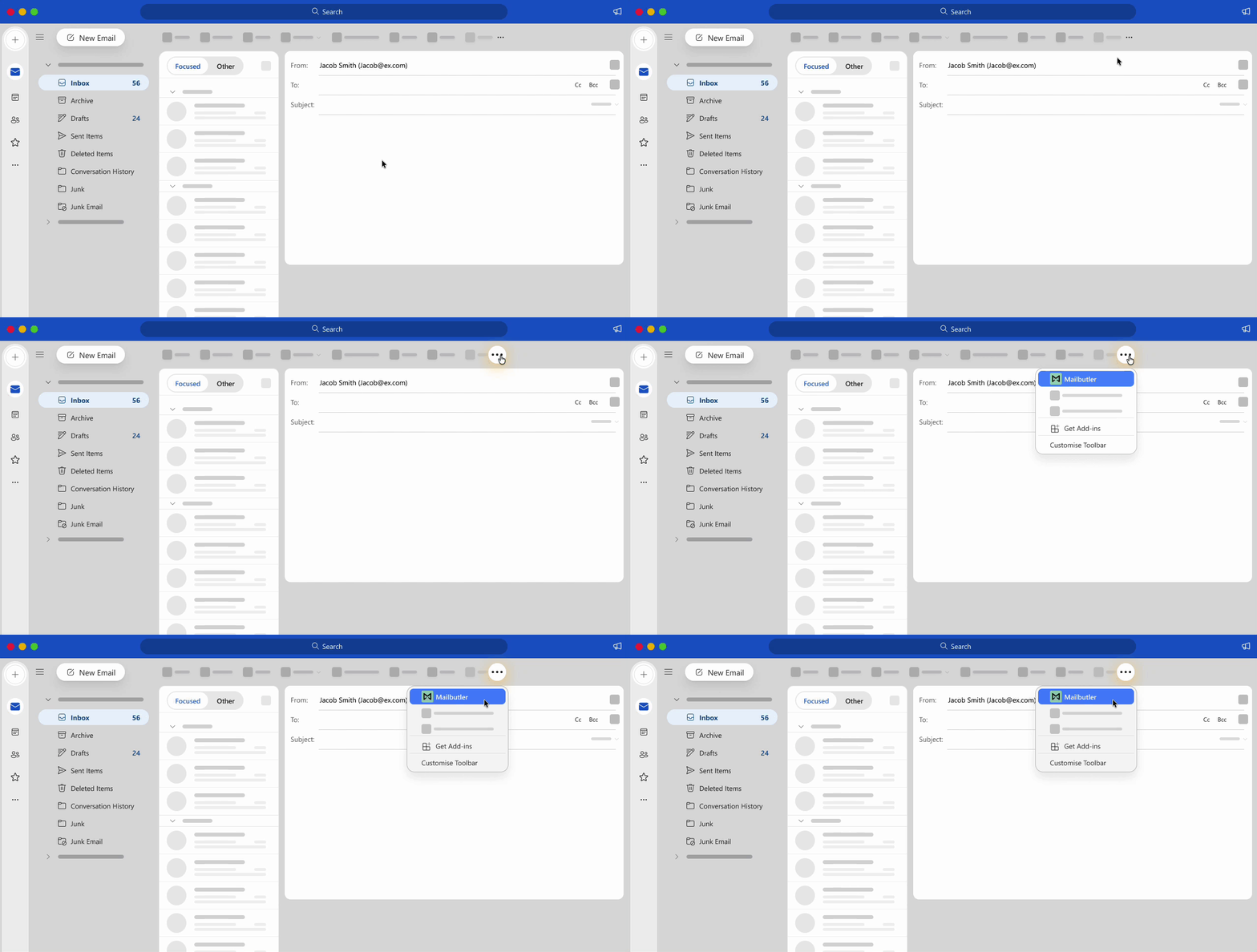
Outlook add-ins can take up to 24 hours to appear in your inbox after installation.
How to open Mailbutler after installation
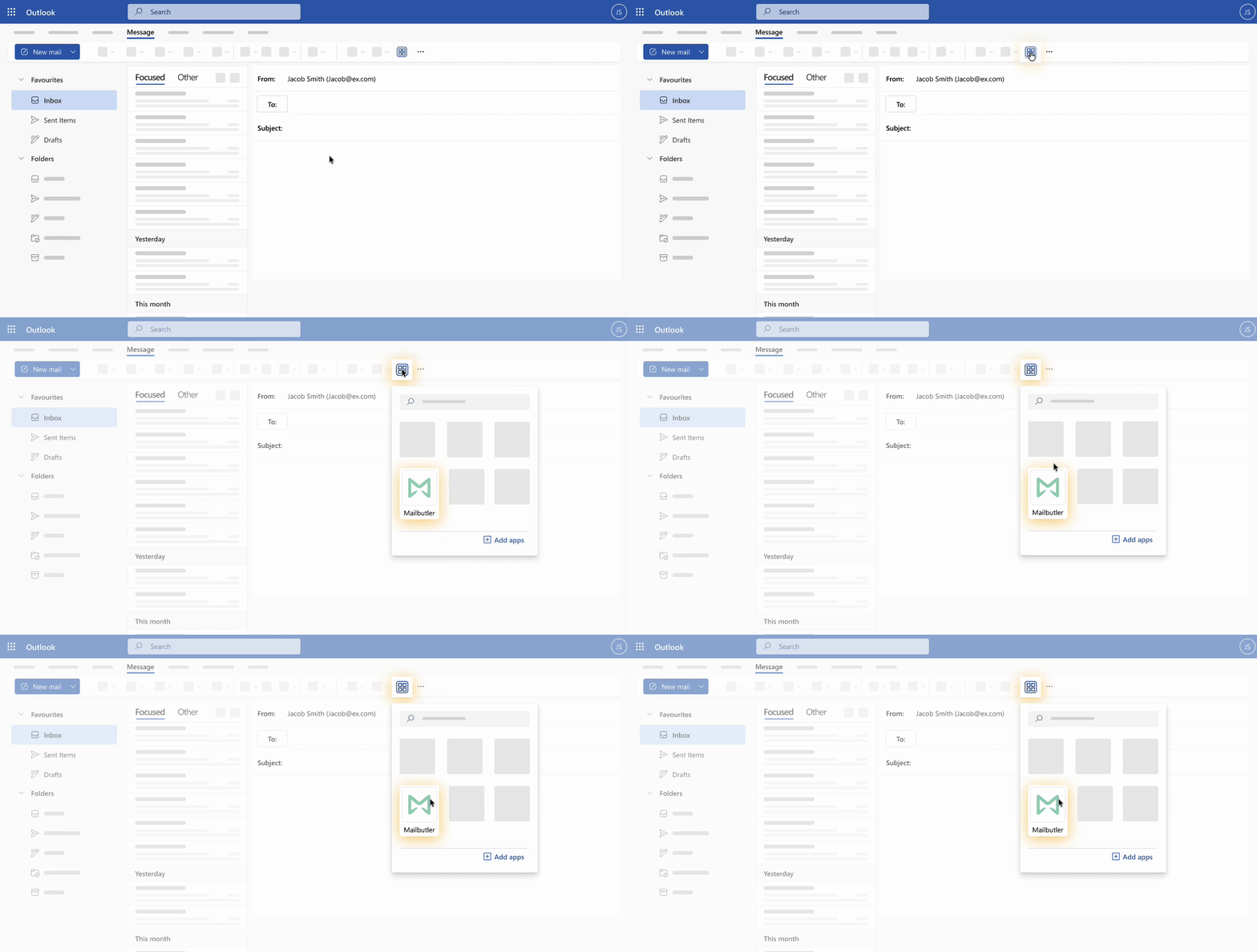
Mailbutler in Outlook for Windows
Outlook for Windows
Outlook for Web
After installing Mailbutler, Microsoft may ask you to open Outlook on the web to get started. Mailbutler will also be installed and available in the Outlook desktop app.
Outlook add-ins can take up to 24 hours to appear in your inbox after installation.
How to open Mailbutler after installation
Outlook add-ins can take up to 24 hours to appear in your inbox after installation.
How to open Mailbutler after installation
Mailbutler in Outlook for Mac
Outlook for Mac
Outlook for Web
After installing Mailbutler, Microsoft may ask you to open Outlook on the web to get started. Mailbutler will also be installed and available in the Outlook desktop app.
Outlook add-ins can take up to 24 hours to appear in your inbox after installation.
How to open Mailbutler after installation
Outlook add-ins can take up to 24 hours to appear in your inbox after installation.
How to open Mailbutler after installation
Mailbutler in Outlook for Mac
Outlook for Mac
Outlook for Web
After installing Mailbutler, Microsoft may ask you to open Outlook on the web to get started. Mailbutler will also be installed and available in the Outlook desktop app.
Outlook add-ins can take up to 24 hours to appear in your inbox after installation.
How to open Mailbutler after installation
Outlook add-ins can take up to 24 hours to appear in your inbox after installation.
How to open Mailbutler after installation
Mailbutler in Outlook for Windows
Outlook for Windows
Outlook for Web
After installing Mailbutler, Microsoft may ask you to open Outlook on the web to get started. Mailbutler will also be installed and available in the Outlook desktop app.
Outlook add-ins can take up to 24 hours to appear in your inbox after installation.
How to open Mailbutler after installation
Outlook add-ins can take up to 24 hours to appear in your inbox after installation.
How to open Mailbutler after installation
Mailbutler ensures my emails get seen and my business keeps moving.

Mailbutler has brought back communication confidence and efficiency for us.