YAMM lives in a spreadsheet.
Mailbutler lives in your inbox.
Send personalized bulk emails, track every open and click, and follow up with AI — all without leaving your inbox


Mailbutler vs YAMM: Feature & pricing breakdown
See how Mailbutler’s inbox-native features compare to YAMM’s spreadsheet-only workflow
Mail merge & templates

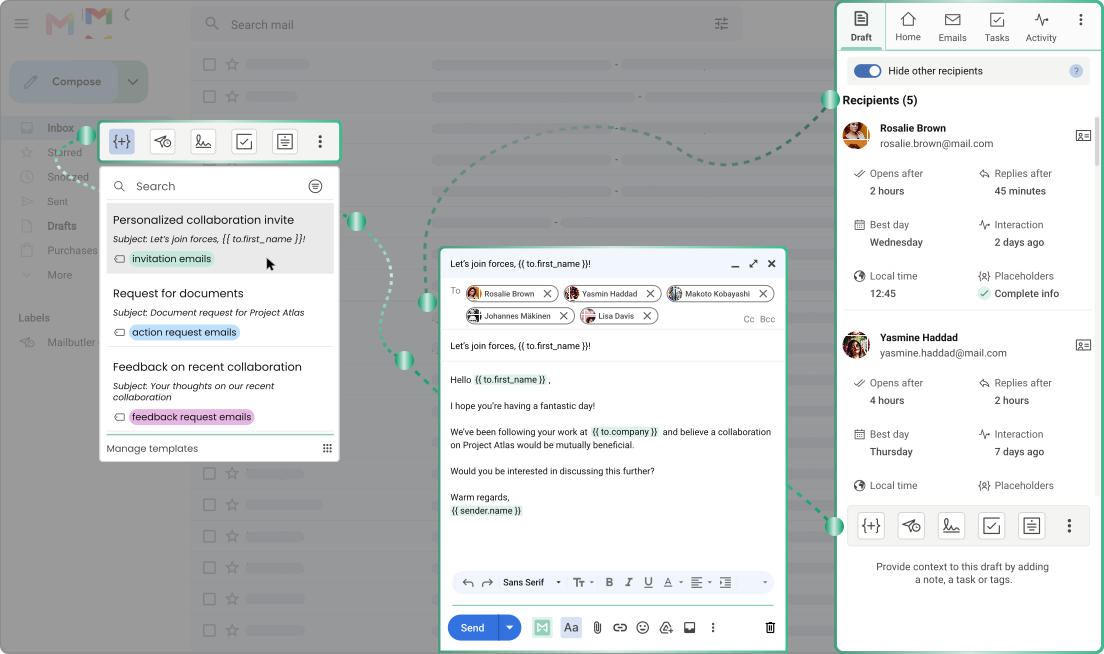
Message templates with dynamic placeholders
Mail merge pulls personalized data from HubSpot, Salesforce, native contacts, or CSV
Sent directly from your inbox, no spreadsheet required
YAMM
Templates via Gmail drafts, personalized with merge tags
Mail merge pulls data from a Google Sheet, manually imported from your CRM
Requires a separate Google Sheet to launch every send
Email tracking
Per-recipient tracking
Link click tracking
Device and location insights
Real-time notifications
Full engagement history, no time limit
Custom tracking subdomain
YAMM
Per-recipient tracking
Link click tracking
No device or location insights
No real-time notifications, check results in the sheet
No engagement history beyond the campaign log
No custom tracking subdomain
Productivity features
AI-powered email assistant
Smart follow-ups — AI flags urgency and drafts replies
Private and shared notes and tasks
Mobile-responsive email signatures
YAMM
No AI-powered email assistant
No automatic follow-up prioritization
No notes or task management
No signature builder
Where it works
Works with Gmail, Outlook, and Apple Mail
Built into your inbox, no separate tool needed
YAMM
Works with Gmail and Google Workspace only
Requires a separate Google Sheet alongside Gmail
Pricing
Mail merge included from the Professional plan, starting at $7/user/month billed annually
YAMM
Paid plans start at $3/user/month billed annually
Why Mailbutler is the smarter choice
Why Mailbutler is the smarter choice
See what you gain when mail merge, tracking, and follow-ups live in one place

Mail merge without the spreadsheet
Send personalized bulk emails straight from your inbox; no Google Sheet required

Real-time engagement data
See opens and clicks the moment they happen, not just in a sheet you have to refresh

AI that prioritizes for you
Follow up at the right time — Mailbutler flags which emails need a reply and drafts it for you
Ready to leave the spreadsheet behind?
Start your free trial today and send your next mail merge without ever opening a Google Sheet