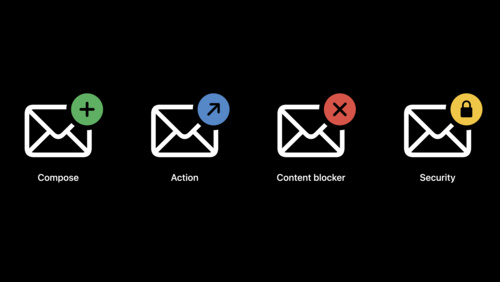
Even though Apple has introduced Mail extensions through the MailKit framework, there aren't many of them available. This is mostly because MailKit, while powerful, has very strict rules and guidelines which some developers find limiting. Because of this, many users still rely on the wide variety of plug-ins that are currently available for Apple Mail.
Below, you can find a list of useful Apple Mail plugins.
List of Apple Mail plug-ins in 2023
Mailbutler
Mailbutler functions as a personal AI assistant, enabling you to work efficiently and productively within Apple Mail. With its various functions, like the new email tagging feature it simplifies, optimizes, and streamlines dealing with emails in your daily life.
SpamSieve
SpamSieve understands what your spam looks like in order to block it all. It learns and adapts to your mail, so it's able to block nearly all junk mail.
EagleFiler
EagleFiler makes managing your information easy. It lets you archive and search mail, web pages, PDF files, word-processor documents, images, and more. You can use it to collect information from various sources and keep them in an organized library that can be searched and browsed easily.
Mail Designer 365
Mail Designer 365 is a visual design platform, dedicated to building responsive email newsletters. It stands out due to its ease of use, allowing users to create professional, mobile-ready newsletters without any HTML coding. It comes with over 200 professional templates, making it ideal for businesses and designers.
MailSteward
MailSteward is an effective tool for archiving your emails for future access. This is extremely important for businesses and individuals who need to keep records of their communications. It can archive your email in a database on your local machine, ensuring you have a safe, searchable record of all your email messages that can be easily navigated and retrieved at any time.
MailTags (not working in macOS Sonoma)
MailTags helps you organize emails beyond folders using keywords or colors, making it easy to tag and find your messages quickly. With MailTags, categorize your Apple Mail emails easily using different tags, and find what you need faster with its smart search feature.
Why Mailbutler outshines other extensions
Among these extensions, Mailbutler stands out due to its remarkable functionality.
Developed to make email management more efficient, Mailbutler offers a variety of features, like advanced email tracking and scheduling, follow-up tasks, task and notes management, and an AI-powered Smart Email Assistant that crafts professional emails, summarizes long emails, and generates tasks from your emails.

Additionally, the integration of Mailbutler with Apple Mail is seamless, making the already familiar interface of Apple Mail even more user-friendly and powerful. Users have reported significant improvement in productivity and email management efficiency with Mailbutler.
While other Apple Mail extensions offer useful features, Mailbutler's broad range of capabilities and seamless integration make it a standout tool for both personal and professional users.
Try the Power of AI in your Apple Mail
Need to write an email quickly? Provide a few words, and the Smart Assistant will draft an email for you.
The future of Apple Mail extensions and Mailbutler
The future of Mailbutler and Apple Mail extensions looks promising. Mailbutler continues to innovate and introduce new features based on user feedback and technological advancements.
As for Apple Mail extensions in general, developers continually strive to enhance user experience and add real value. The possibilities of refined, advanced, and user-friendly features are vast and evolving, offering users a chance to personalize and enrich their experience.
Related post: Why Apple decided to stop support for Mail plugins
Apple Mail extensions FAQs
Are there extensions for Apple Mail?
Yes, there are extensions for Apple Mail. These plugins, or extensions, can add a variety of features to the Mail application, from improved spam filtering and email tracking to the ability to schedule emails for future sending.
Where are Apple Mail extensions (plug-ins) stored?
Apple Mail plugins are typically stored in one of the following locations on your Mac:
- In the Mail app's Plugin folder:
~/Library/Mail/Bundles
- In the system-wide Library:
/Library/Mail/Bundles
Keep in mind, however, that these locations might vary slightly depending on the version of macOS you're using.
It's also worth mentioning that Apple Mail plugins need to be compatible with the version of the Mail app you're using. With each major update of macOS, the Mail app typically receives an update as well, and this can sometimes break compatibility with existing plugins until the developers update them.
Similar post: How to add email notes on Apple Mail
Summary
In conclusion, Apple Mail extensions, especially Mailbutler, are a great way to transform the built-in Mail app into a comprehensive productivity hub. Whether it's the ease of scheduling emails, organizing tasks, or following up on important conversations, these extensions can greatly enhance your daily efficiency.
If you're an Apple Mail user, exploring these extensions, starting with Mailbutler, could change the way you manage your emails and tasks.
Remember, productivity is not about doing more work - it's about making your work more effective. Apple Mail extensions, and particularly Mailbutler, play a significant role in this process.
Embrace the future of email today and let these powerful tools for Apple Mail help you manage your email communication with ease and efficiency.