




5 Best Mixmax Alternatives
Mixmax alternatives for 2026: compare 5 tools on price, features, and platform support to find the right fit.

Explore 48 examples of effective email closing lines and best practices for creating memorable and engaging endings to your emails.
Irena is an experienced content and email marketer who loves animals, slow mornings, and all things Tolkien.
TL;DR
The best email closing lines are clear, polite, and action‑oriented. Research shows gratitude-based closings significantly improve reply rates. In this post you’ll find best practices along with 48 practical examples.
Email remains one of the most widely used communication tools worldwide, with over 376 billion emails sent and received daily in 2025. In such crowded inboxes, your closing line becomes a key driver of clarity and response.
Boomerang’s analysis of 350,000+ threads found that emails ending with expressions of gratitude achieved up to 65.7% reply rates, outperforming standard closings by a wide margin.
Fact nugget: Your final sentence is often the part of the email that determines whether someone replies.
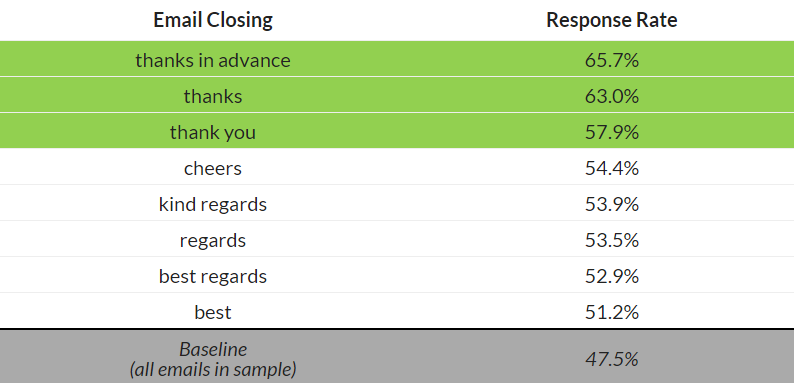
Source: Boomerang
A closing line is the final sentence before your sign‑off. It wraps up your message, clarifies expectations, and creates a lasting impression.
Why it matters: Effective communication is directly tied to productivity — well‑connected teams see a 20–25% productivity increase.
A strong closing line is:
Clear
Polite
Action‑oriented
Matched to tone and context
Please let me know if you have any questions.
Looking forward to your response.
Let me know how you’d like to proceed.
I appreciate your time.
Thank you for your attention to this matter.
I look forward to working together.
Happy to help if anything comes up!
Let me know what you think.
Excited to hear your thoughts.
Talk soon!
Hope your week is off to a great start.
Glad to help whenever needed.
Thank you again for your help.
Really appreciate your quick response — thank you!
Thanks for the update.
Thank you for considering my request.
Thanks in advance for your time.
Appreciate your support on this.
Let me know if you’d like to explore this further.
Would you be open to a quick call?
Can I send more details your way?
Looking forward to hearing your thoughts.
Happy to walk you through a demo.
Let me know if this aligns with your goals.
Just checking in — any updates?
When you get a moment, could you take a look?
Following up here in case this got buried.
Let me know if you need anything else.
Looking forward to your update.
Appreciate you taking another look.
Does Tuesday at 10 AM work?
Let me know your preferred time.
Happy to reschedule if needed.
Please confirm your preferred time.
Looking forward to our meeting.
Let me know if you'd like a calendar invite.
Thanks for your collaboration on this.
Let's touch base after you’ve reviewed.
I’ll take it from here — thanks!
Keep me posted on next steps.
Let me know if you spot anything.
Thanks for leading this effort.
I appreciate your prompt attention to this matter.
Please don’t hesitate to reach out.
I look forward to your formal approval.
I remain at your disposal for further information.
Many thanks for your continued partnership.
I await your confirmation.
Mailbutler helps you craft and automate effective closings with:
Email Templates — save and reuse your best lines.
AI Email Assistant — draft complete, polished responses automatically
Smart Send Later — time emails strategically
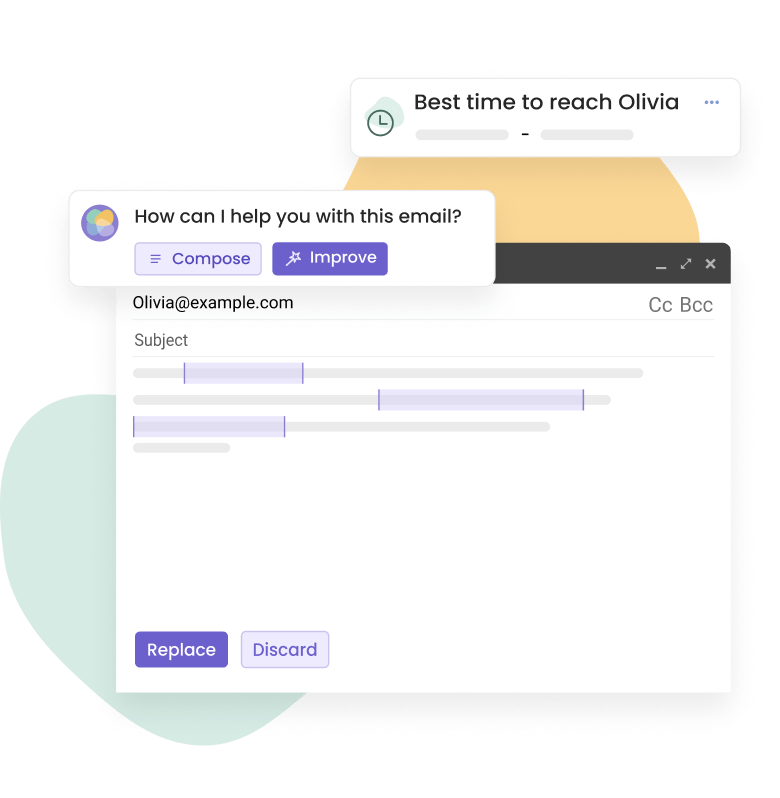
Mailbutler's message templates, AI writer, and scheduling feature
Choose based on:
Goal: Need a reply → use an action‑oriented line.
Tone: Formal vs. casual.
Relationship: New contact vs. colleague.
Context: Follow‑up vs. initial outreach.
Fact nugget: Email remains a core workplace channel—86% of professionals prefer email for work communication—so tailoring your closing line is essential.
Yes — gratitude-based closings perform best, achieving 65.7% response rates.
Yes. Showing appreciation increases positive impressions and reply likelihood.
Because communication quality influences productivity; effective communication correlates with a 20–25% productivity increase.
From a thread titled “What are your favorite email closing lines?” (on r/therapists)
I always use ‘best’. … ‘Talk soon’ and ‘with care’ are my two main ones.
From a thread titled “Anybody feel awkward about email closings?” (on r/socialskills)
I often close my emails with ‘thank you’ because it is the best closing I can think of but am afraid it seems entitled or assuming…
From a thread titled “Closing salutations in emails. Best? Worst? Should they be used???” (on r/office)
I usually end with Regards or Best Regards depending on the person. Or just Thanks.
From a thread titled “What closing phrase do you use when replying to customer emails?” (on r/ecommerce)
“Cheers” was the highest‑voted response when people shared what they use in customer email replies.
From a thread titled “Looking for input on professional email etiquette” (on r/etiquette)
Usually use ‘Thanks!’ followed by signature … stick with warm regards … Thank you for your time/help.
Gratitude-focused closing lines outperform all others.
Choose closing lines that match tone, goal, and context.
Email remains the dominant workplace communication channel.
With Mailbutler you can quickly write polished emails with AI, save reusable templates, and scheduling messages for the right moment.




Mixmax alternatives for 2026: compare 5 tools on price, features, and platform support to find the right fit.
Looking beyond Mailsuite? We compared 10 email tracking and mail merge tools for Gmail and Outlook, with 2026 pricing and trade-offs.

10 Scribe alternatives compared, focusing on pricing, brand governance features, and honest trade-offs for teams of every size.
Top 5 alternatives to MailTracker for Gmail, with real pricing, feature breakdowns, and honest trade-offs to help you pick the right one.
Looking for the best Outlook mail merge tool? We compare 5 options on pricing, personalization depth, and data privacy to help you pick the right one.
Looking for the best Front alternatives? Compare 10 shared inbox and help desk tools on price, features, and fit.