









10 Best Mailsuite Alternatives in 2026 (Free & Paid)
Looking beyond Mailsuite? We compared 10 email tracking and mail merge tools for Gmail and Outlook, with 2026 pricing and trade-offs.

Discover why Mailbutler is the best Word mail merge alternative for Outlook. Create, send, and track personalized emails—no Word required.
As Head of Customer Success at Mailbutler, I help people improve the way they communicate and work more efficiently. I enjoy writing about productivity, email management, and technology. Outside of work, I love spending time in nature.
TL;DR
Traditional Word mail merge has helped Outlook users send personalized emails for decades, but it requires switching between Word, Outlook, spreadsheets, and contact lists.
Mailbutler offers a simpler alternative. Instead of jumping between multiple Microsoft applications, you can create, personalize, send, and track mail merge campaigns directly within Outlook, using templates, contact data, CRM integrations, and recipient-level analytics.
Fact nugget: Mailbutler allows users to create personalized bulk email campaigns directly from Outlook without relying on the traditional Word Mail Merge workflow.
Direct answer: Traditional mail merge in Word requires multiple Microsoft applications to work together, including Word, Outlook, and a separate data source such as Excel.
Word mail merge relies on a multi-step setup process. Recipient data must first be stored in a spreadsheet or database, then connected to a Word document using merge fields before emails can be sent through Outlook.
This means you're not managing a single workflow. Instead, you're coordinating information across several different tools.
Every time you create a campaign, you may need to:
Update your contact list
Verify your merge fields
Preview the merged content
Switch between Word and Outlook
Troubleshoot formatting issues
As campaigns become larger or more frequent, these manual steps can add significant overhead.
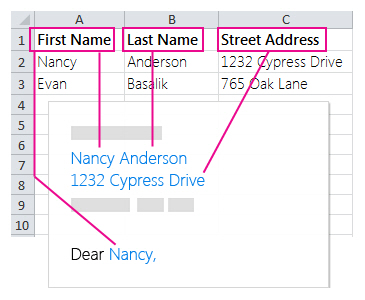
Source: Microsoft
Fact nugget: Most of the complexity of mail merge for Word comes from having to work across multiple applications rather than from the email personalization itself.
Direct answer: The biggest limitation of mail merge in Outlook is that it focuses almost exclusively on sending personalized emails, while modern outreach workflows require much more than that.
Some common limitations of mail merge for Word include:
No built-in email tracking
No visibility into opens, clicks, or engagement
No CRM integrations
A steeper learning curve for new users
As a result, many teams need additional tools to manage the parts of the email workflow that Word mail merge doesn't cover. They need a workflow that helps them create, send, and measure campaigns from a single place.
Fact nugget: Word mail merge helps personalize emails, but it does not provide built-in campaign tracking, analytics, personalization preview, or CRM connectivity.
Direct answer: Mailbutler's Mail Merge is one of the simplest alternatives for Outlook users because it lets you personalize, send, and track email campaigns directly from your inbox.
Instead of switching between Word, Outlook, spreadsheets, and external tools, Mailbutler centralizes the entire mail merge process within your existing Outlook workflow.
Because everything happens directly within Outlook, getting started is straightforward—even if you've never created a mail merge campaign before or you’re not tech savvy.
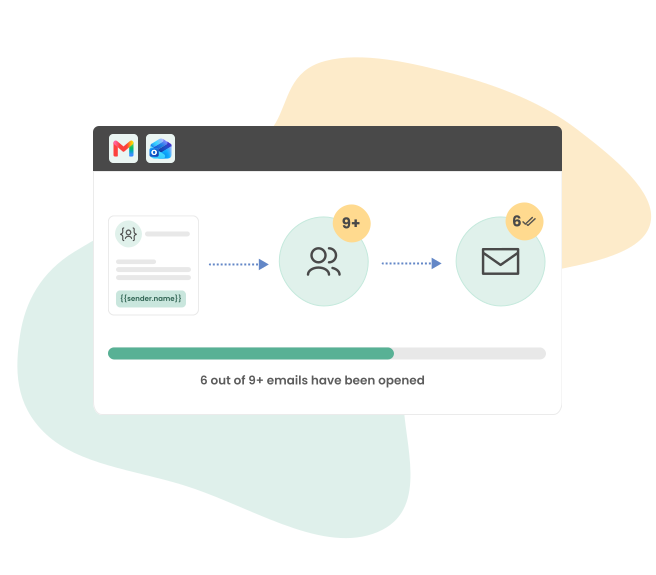
Source: Mailbutler
Connect contact sources
Import CRM data
Connect CSV files
Create reusable email templates
Add dynamic placeholders
Preview personalization before sending
Send personalized bulk emails
Schedule emails for the best days & times to reach each recipient
All of this happens within your existing workflow, helping you spend less time setting up bulk emails and more time connecting with your recipients.
Fact nugget: Mailbutler lets Outlook users create, send, and track personalized mass emails without relying on Microsoft Word.
Direct answer: Mailbutler simplifies mail merge into a straightforward workflow consisting of data connection, personalization, sending, and tracking —all directly within Outlook.
Mailbutler lets users connect:
CSV files
This eliminates the need to constantly manage separate spreadsheets.
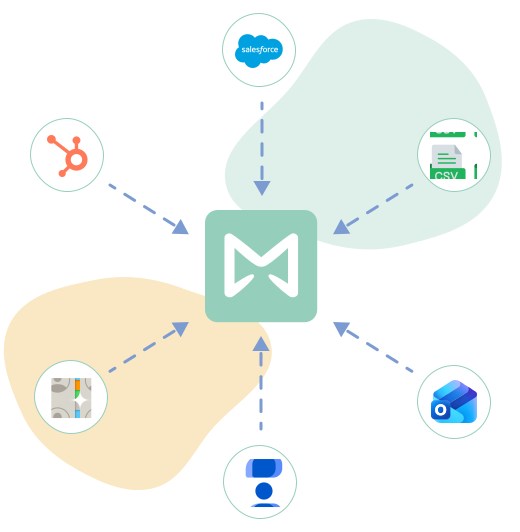
Source: Mailbutler
Write your email once.
Include dynamic placeholders for:
First name
Last name
Company
Job title
Custom fields
The system automatically personalizes every outgoing message.
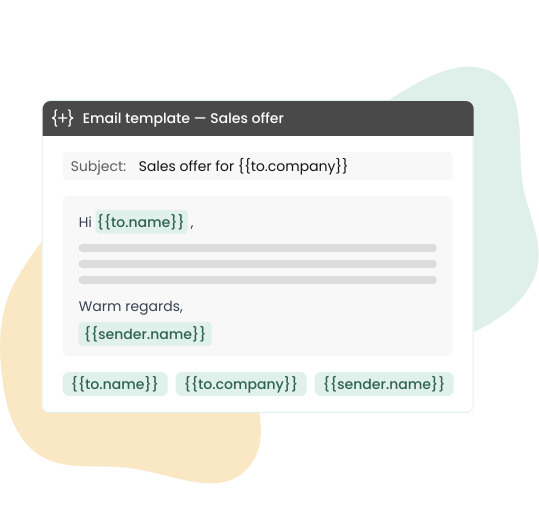
Source: Mailbutler
Recipients can be added manually or selected from a contact group in your contacts tool.
Before sending, Mailbutler validates personalization fields and allows you to preview exactly how each personalized email will appear for each recipient.
This helps prevent awkward errors such as missing names or broken placeholders.
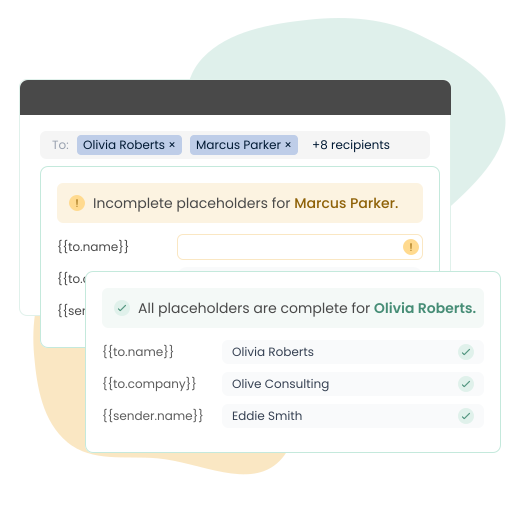
Source: Mailbutler
Send your personalized emails immediately or schedule them to be delivered later. Mailbutler can schedule emails for the best day and time to reach each recipient.

Source: Mailbutler
Users can monitor:
Opens
Clicks
Engagement
on a recipient-by-recipient basis.

Source: Mailbutler
Fact nugget: Traditional Word Mail Merge focuses on sending emails. Mailbutler focuses on sending and measuring results.
| Feature | Word Mail Merge | Mailbutler |
|---|---|---|
|
Mail Merge directly in Outlook |
❌ No |
✅ Yes |
|
Works without Microsoft Word |
❌ No |
✅ Yes |
|
CRM integration |
❌ No |
✅ Yes |
|
Personalization preview |
❌ No |
✅ Yes |
|
Tracking |
❌ No
|
✅ Yes |
Direct answer: The biggest advantage of Mailbutler is that it combines personalization, sending, and tracking in a single Outlook workflow.
Word mail merge was originally designed to help users personalize emails. Mailbutler builds on that concept by adding modern productivity features such as recipient-level tracking.
For many Outlook users, the benefit isn't simply having more features—it's having fewer steps.
Instead of managing multiple tools, you can work directly from the inbox you already use every day.
Whether you're contacting prospects, clients, candidates, or partners, this streamlined workflow can save time while making sending bulk emails easier to manage.
Yes. Mailbutler lets you create, personalize, and send bulk emails directly from Outlook using reusable templates and dynamic placeholders, eliminating the need to switch between Word and other tools. Mailbutler also includes tracking, so you can monitor opens, clicks, and recipient engagement after your emails are sent.
Yes. Mailbutler makes it easy to create and send mail merge campaigns directly from Outlook, with no technical knowledge or prior mail merge experience required. Because the entire workflow takes place within Outlook, getting started is straightforward. Word mail merge, on the other hand, requires multiple setup steps and switching between Word, Outlook, and spreadsheets before you can send a campaign.
Yes. Mailbutler provides recipient-level tracking, allowing you to monitor opens, clicks, and engagement for every email in your mail merge campaign.
Traditional Word mail merge can be a complex process, requiring you to switch between Word, Outlook, spreadsheets, and other tools to create and send campaigns.
Mailbutler simplifies mail merge by keeping the entire workflow inside Outlook, eliminating the need to jump between multiple applications.
Beyond basic mail merge functionality, Mailbutler helps you create more effective campaigns with CRM integrations, personalization preview, and recipient-level tracking.
From a thread titled “Automate/lessen Mail Merge steps in Excel or Automate” (on r/excel), a user writes:
Right now with Word, I have to save each pages separately to pdf and put password to files individually and it's really cumbersome and repetitive.
From a thread titled “Mail Merge HELP” (on r/Outlook), a user writes:
I usually use Gmail for email but am now trying to use Outlook/Word to send out a Mail Merge... I ended up emailing through Gmail since the time it was taking to figure it out was taking longer than it would for me to send them individually.




Looking beyond Mailsuite? We compared 10 email tracking and mail merge tools for Gmail and Outlook, with 2026 pricing and trade-offs.

10 Scribe alternatives compared, focusing on pricing, brand governance features, and honest trade-offs for teams of every size.

Top 5 alternatives to MailTracker for Gmail, with real pricing, feature breakdowns, and honest trade-offs to help you pick the right one.

Looking for the best Outlook mail merge tool? We compare 5 options on pricing, personalization depth, and data privacy to help you pick the right one.

Looking for the best Front alternatives? Compare 10 shared inbox and help desk tools on price, features, and fit.

Compare the 5 best email trackers for Outlook in 2026 — from lightweight add-ins to Salesforce-native tools.