Irena is an experienced Content and Email Marketer who loves animals, slow mornings, and all things Tolkien.
Topics
The email signature is one of the most untapped marketing and lead-generation tools. Signature marketing has one of the highest impression rates, offers high volume at an extremely low cost, and is built on trust and valued communication.
Yet most businesses fail to properly track their email signature marketing campaigns, or don't even use email signature marketing.
Each time you send an email without making use of an email signature, you’re losing a chance to tell your story.
This is why in this article, we’ll guide you through the key essentials of signature marketing, why it works, the best practices of email signature marketing, and finally, show you the best way to implement your next signature marketing campaign.
Key takeaways
Email signatures are an untapped marketing tool with high impression rates and low cost.
Signature marketing works well because email remains a primary communication channel, especially in B2B.
Effective email signatures include clear call-to-actions and visually appealing banners.
Signature marketing is versatile and can be used by everyone in a company, not just the marketing team.
Testing different email signatures and tracking their performance helps optimize marketing efforts.
What is email signature marketing?
We have all come across an email signature, and you might already be using one. A good email signature will be rich with key information like name, title, business, and other contact information.
(For more information on this, check out our guide on how to create a signature that drives brand awareness and shows off professionalism.)
But let us clarify this upfront: Simply having an email signature does not necessarily mean you are doing signature marketing right!
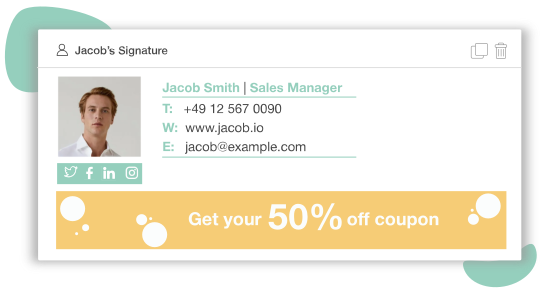
Signature marketing goes one step further with links and banners that generate conversions.
Designs that are optimized for marketing includes clear call-to-actions and visual campaigns containing banner and tracked links.
Your team is most likely spending a great amount of time and effort creating engaging content for your audience.
So why would you waste the space in hundreds (or even thousands!) one-to-one business emails your employees send to promote your company initiatives?
Premade signature templates
Why email signature marketing works
Despite the popularity of social media and influencer marketing, email is nowhere near its ending days.
Email remains the top channel of communication for over 86% of professionals and is the 3rd most influential source of information for B2B audiences. According to a study from Hubspot.
Moreover, 91% of 2.6 billion email users check their inbox daily, compared to Facebook (57%) and Twitter (14%). While most users don’t like receiving marketing messages on social media, 77% of users prefer emails for permission-based promotional messages.
And not only that: this study also shows that email reaches 79% of the people you send it to.
The email has a clear advantage, when compared to only 1–6% organic reach of Facebook and <1–30% for Twitter.
Most importantly: the average open rate (18%) and CTR (3.7%) of email prove its effectiveness compared to Facebook (0.07%) and Twitter (0.03%)!
This is even more relevant in B2B marketing, where email remains the most personal and high-touch form of communication.
Phew - lots of numbers. We can go on and praise the effectiveness of email marketing, but let's stick to our focus: the importance of email signature marketing.
Email Signatures for free
Create unique email signatures from our professionally designed templates.
The name ‘signature marketing’ is misleading because it's definitely not only for marketing teams. Everyone in your whole company sends and receives emails.
Signature marketing, compared to other channels of campaigns, therefore delivers high volume at a very low cost. (Very low cost.)
What does this all mean? Well, no matter the size of your team - from a company of one to a large enterprise of thousand employees - the power of signature marketing is in the hands of every single department, team and person in your business.
Need more convincing? Here are five solid reasons why you should start email signature marketing yesterday:
Email outperforms social media on all key metrics
One-to-one email is personal and trusted, offering high authenticity to your marketing materials
Signature campaigns are low cost with a high delivery volume
It's a well-controlled ad display location
Everyone in your team can contribute!
Finally, one of the key differences between a signature and a PPC campaign is the level of control.
With your signature, you and your team can fully monitor the ad placement, location, recipient and delivery frequency.
Best practices for email signature marketing
Banners are your friend
What's the best CTA to include in an email signature? A plain text hyperlink? A CTA button? No and no. The highest engagement rate is to be found in the wonderful banner.
Among both existing customers and prospective clients, a good-looking banner is the best way to get a clickthrough and win new leads. So why not include one?
Instead of having to remember to throw a banner into each message automation or cold email you send out, include one in your signature and it'll always be there, clearly visible at the bottom of the page, not intruding in the email or breaking the flow of the copy. Lovely.
Keep it simple
Adding too much information to your email signature is always a mistake. For marketing campaigns, focus on just one single marketing message that you want to promote.
Don't try and stuff several different CTAs or messages into one signature.
Remember, you can always simply make a second signature to promote your other marketing campaign! (See point 4.)
The same goes for the actual content of your signature. After already having read your email, your recipient doesn't want to trawl through two paragraphs of your email signature - they want to see your name, where you work, and where they can go for more information.
Standard advice on an email signature is no more than seven lines - and even that's pretty long - and to only include really relevant stuff.
Make sure you have your contact details and a link or two included, of course, but don't add every social media network you've ever signed up to, your fax number, and your cat's middle name.
It's unnecessary information which, if needed, can be shared later after the recipient has got in touch with you.
You've written a great email, your recipient is convinced, and your marketing message was successful - but they want more information. Unfortunately, you've forgotten to include the CTA in your campaign in your email.
But it's not a problem, because all they have to do is click on the link in your signature to head straight to your website, or email you back, or check out your social media profile.
A great way to do this is to include a marketing banner next to your website address that links directly to a landing page relevant to your marketing campaign.
This landing page should provide your recipient with all the relevant information to your marketing campaign, including a place to take the next step, such as registering for your service.
This is why including links in your signature - such as a banner - is so important.
Firstly, it means if you ever forget a link in the body of your email, there's always somewhere your recipient can click through; and secondly, it's a great place to convince people who might not want to click on your email's CTA that there are other places they can go to continue engaging with your company.
You aren't the same as your colleague, or your partner, or your grandma, so why assume your recipients are? Using the same signature for all outgoing messages is a common mistake, as people are different and will react to different things.
Try creating tailored signatures for each persona, team, department, company, or demographic. This personalization can have a really interesting effect on your click-through rates and general engagement and is also a great way to test out different email signatures so you can find the one that performs best.
Test and measure
According to Haley Slade CEO & Founder at Slade Copy House
You should test different email signature designs, CTAs, and promotional banners to see what works best. Use analytics to measure the effectiveness of your email signature marketing and adjust your strategy accordingly.
Another great reason to have multiple signatures is, as already mentioned in this article, to be able to send out multiple marketing campaigns, each of which has its own dedicated email signature.
Having several different signatures lets you customize your marketing banner to fit the needs of the campaign you're promoting, and these different banners can link to separate landing pages, increasing your chances of success.
Here is how the VP of Mailmodo, Tarun Agarwal uses his signature:
Your signature is only as good as the user's journey
So you've taken our advice and made a brilliant, good-looking signature, personalized to your recipient, and with the relevant marketing banner in place.
Unfortunately, the banner links to a shoddy landing page that couldn't convince a dog to chase a ball. It doesn't matter how good your signature is - your end result is to get a conversion, which you won't achieve if your user journey isn't as good as it can absolutely be.
Ask yourself exactly what your recipient should do after they click on your banner and end up on your landing page. Make sure it's intuitive and easy for them to take the next step.
Also think about what questions they might have after they've left their inbox and headed to your website, and try and answer them before they even are able to think about them to show you've always got the customer in mind.
Your marketing banner and marketing email signature are only successful when your landing page is optimized!
Pain points of starting a signature campaign
All that being said, there are plenty of reasons why businesses are neglecting the importance of their email signatures. One is that there isn't necessarily an easy way to implement an email signature across a whole company that looks great on different email clients.
On top of that, the more employees your company has, the more time-consuming it is to manually monitor the effectiveness of campaigns, or to keep everyone's signatures compliant and on-brand.
It's also easier said than done to create a performing signature.
Without knowledge of coding or at least HTML, your marketing team might be reluctant to take on the task to design a good-looking and converting signature.
At the same time, designers can find it difficult to keep track of marketing ROIs that are crucial to measuring the success of your signature campaign.
This means to successfully start a signature campaign, your business needs a single solution that lets you:
Easily create professional designs that fit your brand
Implement, sync, and share trackable marketing materials for everyone in the team
Monitor campaign ROIs to help you adjust marketing messages and allocate resources effectively.
But guess what? That solution exists.
Design, share and monitor your signature campaign effortlessly with Mailbutler
Luckily all of the above can be easily resolved by an intuitive solution. Mailbutler is a feature-rich email productivity plugin for Gmail, Outlook and Apple Mail.
It offers a highly customizable signature generator with built-in designs that help any team kick start their campaign, with no HTML or design knowledge required. After a template is created, signatures are automatically generated for your team and ready to be used in your next outgoing email.
Paired with Mailbutler's built-in email and link open tracking, your team can easily optimize communication and next steps.
Are you ready to take email signature marketing to the next level? We're here to help. Find out more about Mailbutler's Email Signatures feature, or contact us to schedule a free demo of our signature marketing solution.
Email signature marketing FAQs
How do I do email signature for marketing?
The easiest way to create an email signature for your email marketing campaigns is to use a customizable email signature generator. Mailbutler’s Email Signatures feature lets you design professional email signatures in Gmail, Apple Mail, and Outlook.
All you have to do is select one of Mailbutler’s ready-made, mobile-responsive email signatures and enter your details. You don’t need to have any coding or design skills.
What’s more, Mailbutler allows you to create a single email signature template and share it with your team so you can all stay on-brand. If you ever change the company email signature template, all of your teammates’ email signatures will update automatically.
Does email signature marketing work?
Yes, it does. Email signatures are criminally underrated marketing and lead generation tools. Email signature marketing works for a number of reasons, but the most important ones are:
More than 90% of email users check their inboxes everyday
Email is the number one channel of communication for more than 86% of professionals
One-to-one business emails are highly trusted
Email signature marketing is extremely cost-effective, controlled, and targeted
Every team member can be part of your email signature marketing efforts
What is signature marketing?
As the name suggests, email signature marketing is an email marketing tactic where employee email signatures are used for marketing purposes. Some of the most common goals of email signature marketing campaigns include:
Highlighting special, limited-time offers
Upselling new features or products
Generating event sign-ups
Sharing important company news (for example, a website relaunch)
Plugging blog posts, ebooks, research papers, podcasts, and other forms of content
Learn the essential email etiquette rules for remote teams. This guide covers best practices for clarity, tone, time zones, subject lines, and async communication, plus how Mailbutler can support efficient email workflows.
Learn how to delegate tasks via email effectively, with clear examples and best practices for remote teams. This guide helps distributed teams and remote professionals improve async communication and streamline workflows.
Learn how to delete emails in Gmail, Apple Mail, and Outlook. Step-by-step guides for single and bulk deletion, plus tips to declutter your inbox faster.