




5 Best Mixmax Alternatives
Mixmax alternatives for 2026: compare 5 tools on price, features, and platform support to find the right fit.

ChatGPT email prompts: explore 10 smart prompts that can help you tackle common tasks with less effort. Master your inbox today!

Irena is an experienced content and email marketer who loves animals, slow mornings, and all things Tolkien.
TL;DR
ChatGPT email prompts can greatly speed up writing, reduce errors, and boost professionalism. With Mailbutler’s AI‑powered Smart Assistant, you get the same advantages directly inside your inbox—in many cases without typing a prompt at all, just by clicking a button to generate, refine, or summarize emails.
Professionals now rely on AI more than ever. A major workplace survey found that over 40% of professionals have already used ChatGPT or similar AI tools at work, especially for writing emails and other communication tasks. Many even admit they use AI tools silently because of the productivity boost they experience.
Email volumes continue rising, and inbox complexity is growing — which is exactly why AI-powered email tools and well‑designed ChatGPT email prompts have become essential.
Direct answer:
Use AI to draft concise, polite meeting requests that include context and ask for availability.
Prompt template:
“Compose an email to schedule a meeting with [name] to discuss [topic]. Ask for availability and keep it concise.”
Pro tip:
Mailbutler’s Smart Task Finder automatically detects action items in replies and turns them into tasks — so you never forget the meeting once it's confirmed.
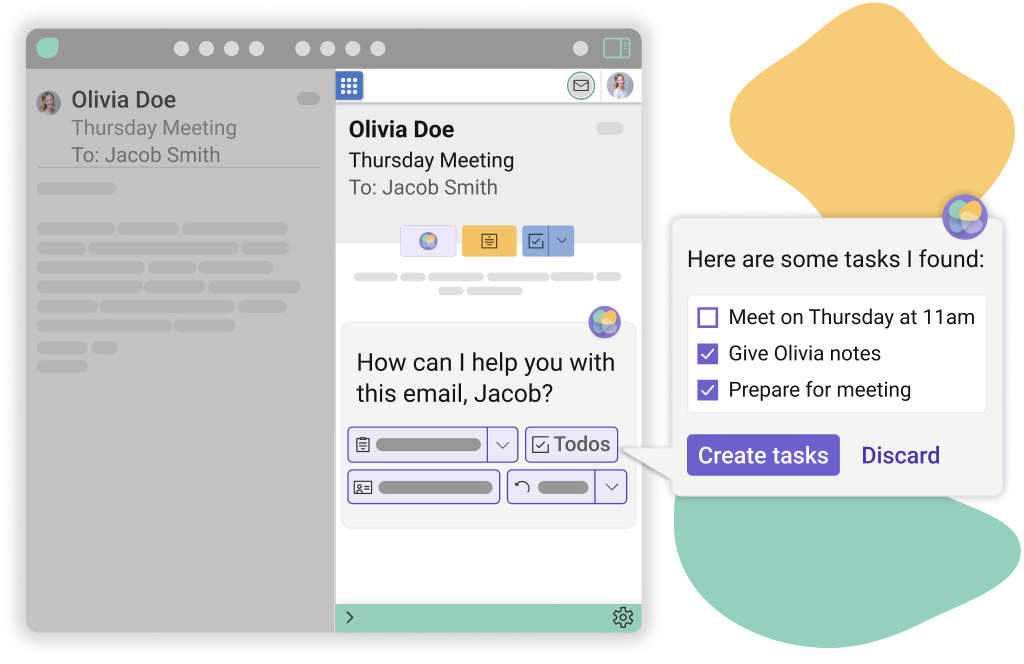
Mailbutler's Smart Task Finder
Direct answer:
Use prompts that reference the prior conversation and highlight benefits.
Prompt template:
“Write a persuasive follow-up email to [name] who showed interest in [product/service] at [event]. Highlight benefits such as [benefits], and keep it under 150 words.”
This prompt helps maintain momentum with leads while staying friendly and professional.
Direct answer:
AI can help draft clear, concise requests that state the purpose upfront.
Prompt template:
“Draft an email asking a colleague for [information] to support [project/goal]. Keep the tone respectful.”
Mailbutler’s Email Tracking lets you check if the recipient opened the message—helpful before sending reminders.
Direct answer:
Use AI to structure updates into completed tasks, progress, risks, and next steps.
Prompt template:
“Write a project update for [team/stakeholder] covering progress, completed tasks, upcoming milestones, and challenges.”
Clear formatting increases transparency and reduces back‑and‑forth.
Direct answer:
Ask for bullet-point summaries to reduce cognitive load.
Prompt template:
“Summarize the following email into key bullet points: [paste email].”
With Mailbutler’s Smart Summarize, you don’t even need to paste text — it summarizes directly inside your inbox.
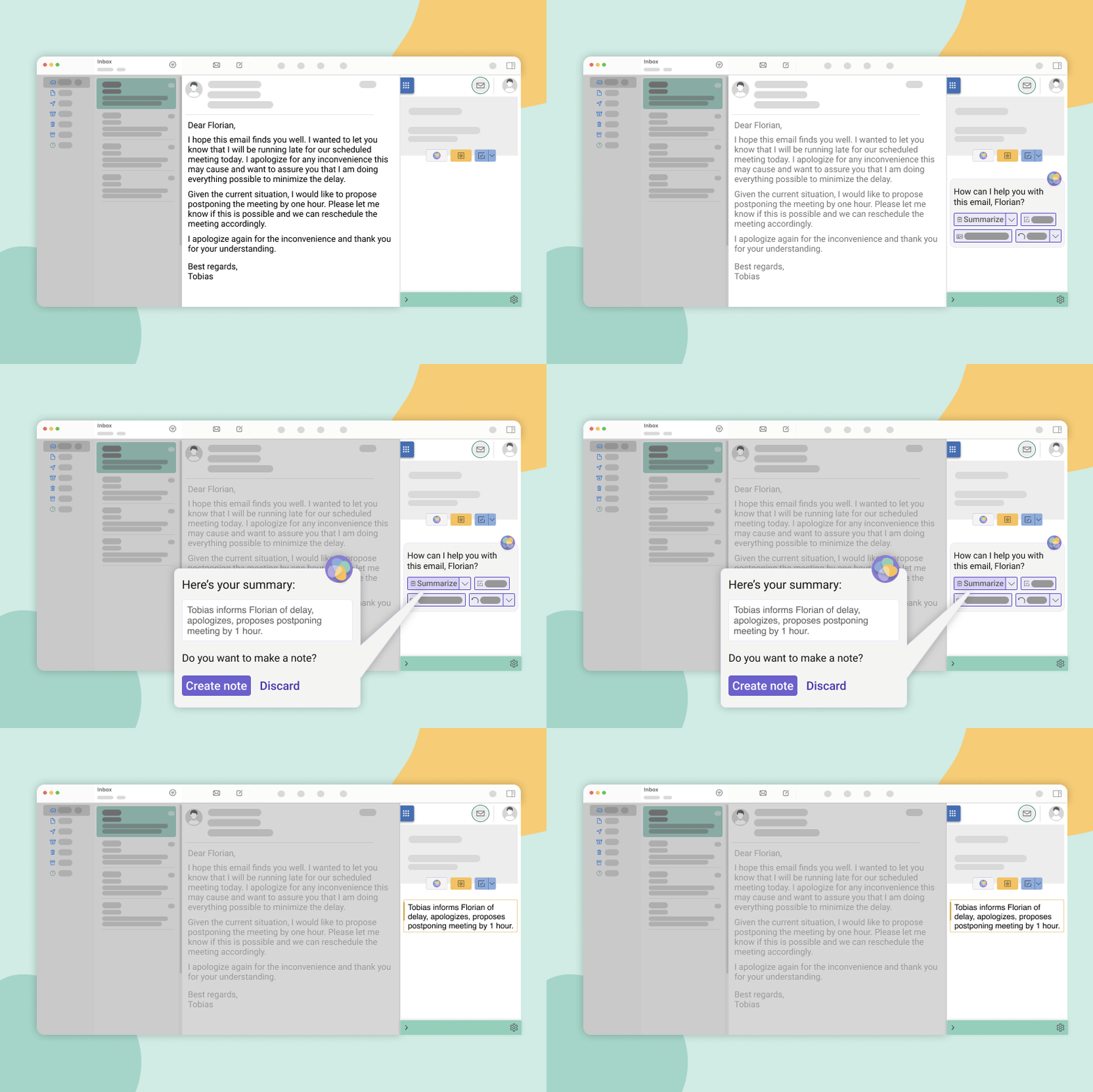
Mailbutler's Smart Summarize
Direct answer:
Use polite but firm language and include the amount, service, and due date.
Prompt template:
“Write a polite email to [client] attaching their invoice for [service], total amount [amount], with a reminder that payment is due on [date].”
Mailbutler’s Smart Compose can generate this in seconds in the inbox without opening ChatGPT externally.
Direct answer:
Apologies should acknowledge the issue, show empathy, and offer a remedy.
Prompt template:
“As a [role] at [company], write a 100‑word apology to a customer upset about [issue], offering [compensation/solution].”
Fact nugget: Empathetic customer communication improves long‑term retention.
Direct answer:
Be warm, make the request simple, and explain how their feedback helps.
Prompt template:
“Write an email asking a satisfied client for a testimonial for our website or to refer us to colleagues.”
This is ideal for consultants, freelancers, and service businesses.
Direct answer:
Express gratitude, state unavailability, and maintain goodwill.
Prompt template:
“Draft a polite email declining an invitation to [event], thanking the sender and briefly explaining the schedule conflict.”
Direct answer:
Job emails should convey enthusiasm, fit, and professionalism.
Prompt template:
“Compose a job application email for the [job title] role at [company], addressed to [hiring manager], referencing my attached résumé and requesting an interview.”
If the tone feels too stiff, write your own version and use Mailbutler’s Smart Improve to polish grammar, clarity, and style.
AI helps you write faster, avoid mistakes, and stay consistent. Many professionals already use AI tools like ChatGPT for tasks such as drafting emails, summarizing content, and generating ideas.
A prompt is a short instruction that tells ChatGPT what to write. Clear prompts = better output. Adding context, tone, and goals produces stronger results.
Mailbutler’s Smart Assistant is the fastest option. It integrates ChatGPT-like capabilities directly into your inbox.
Yes, because you avoid copy/paste, stay focused, and gain extra email productivity features like Email Tracking, Signature Marketing, Shared Inbox Collaboration, Mail Merge, and much more.
From a thread titled “How are you using ChatGPT to write emails?” (r/sales):
I’ve started using ChatGPT to write my email and holy moly it’s a god send… I just write out my rough email and ask ChatGPT to revise it with a ‘friendly yet professional tone’ and boom.
From a thread titled “How are you using ChatGPT to write emails?” (r/sales):
I usually send our company’s overview email and then add the persona’s details… and ask ChatGPT to personalize my company to this POC. I also got compliments because I wrote a Harry Potter referenced email to a prospect who liked HP.
From a thread titled “What’s your favorite ChatGPT productivity hack?” (r/productivity):
Draft an email, or update email to different tone… summarize a meeting from a transcript or notes, and produce minutes and action items.
From a thread titled “What’s your favorite ChatGPT productivity hack?” (r/productivity):
Before ChatGPT, I never applied to jobs with cover letters. Now I have a cover letter customized to job postings in seconds.”
ChatGPT email prompts save time, improve clarity, and reduce stress.
Mailbutler expands these benefits by integrating AI directly into Outlook, Gmail, and Apple Mail, and enriching them with additional email productivity features on top.
Good prompts = better outputs.
AI email workflows are now essential to staying competitive.




Mixmax alternatives for 2026: compare 5 tools on price, features, and platform support to find the right fit.
Looking beyond Mailsuite? We compared 10 email tracking and mail merge tools for Gmail and Outlook, with 2026 pricing and trade-offs.
10 Scribe alternatives compared, focusing on pricing, brand governance features, and honest trade-offs for teams of every size.
Top 5 alternatives to MailTracker for Gmail, with real pricing, feature breakdowns, and honest trade-offs to help you pick the right one.
Looking for the best Outlook mail merge tool? We compare 5 options on pricing, personalization depth, and data privacy to help you pick the right one.
Looking for the best Front alternatives? Compare 10 shared inbox and help desk tools on price, features, and fit.